
Premium indicators
Backtest - Strategy Builder
1. Overview
The Strategy Builder is a powerful tool for backtesting custom trading strategies on TradingView without writing any code. It allows you to connect signals from other indicators, build sequential entry and exit rules, and simulate trades with realistic leverage and risk management.
2. Core Concepts
The backtester operates on a simple but flexible logic system:
- External Signals: These are the inputs for your strategy. They are plots or values from other indicators on your chart (e.g., a moving average, RSI value, or a custom signal line).
- Conditions: A condition is a true/false check that compares an External Signal to a value (e.g.,
PriceGreater thanMoving Average). - Sequential Steps: You can assign conditions to Steps (1-5). The strategy must satisfy all conditions in Step 1 before it evaluates Step 2, creating a logical funnel for entries and exits.
- Logic Gates (
AND/OR): Combine multiple conditions within the same step.ANDrequires all conditions to be true;ORrequires at least one to be true.
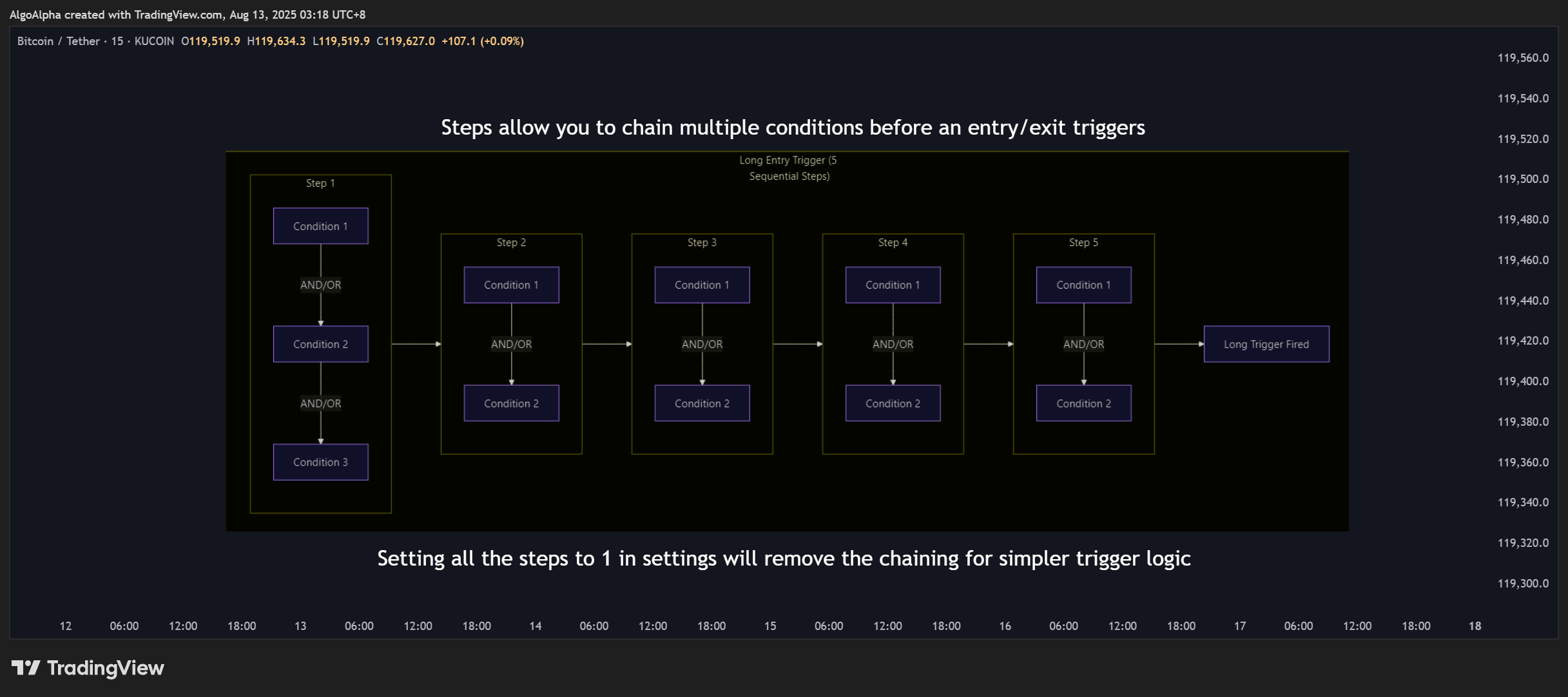
Hint: How the Alert Logic Works (Similar to Alerts Engine)
The alert system evaluates conditions for any given step in a specific order. Understanding this is key to building complex alerts correctly.
- Hierarchy is by Number: The system processes conditions based on their input number (Condition 1, then Condition 2, then 3, and so on), not the order you enable them.
- Boolean Chaining: The
AND/ORboolean operator for a condition connects it to the logical expression that comes before it in the sequence. - First Boolean is Ignored: Because of this chaining, the boolean setting for the very first enabled condition in any step's sequence is always ignored, as there is no expression before it to connect to (this is why Condition 1 has no boolean input option).
Example:
Imagine for Step 1 you enable:
Condition 2(set to OR)Condition 4(set to AND)Condition 5(set to OR)
The final logic will be evaluated as: (Condition 2) AND (Condition 4) OR (Condition 5).
The OR from Condition 2 was ignored. The logic used the AND from Condition 4 and the OR from Condition 5.
- Leverage & Sizing: The system simulates margin trading by calculating position sizes based on your chosen leverage and allocation method, including simulated liquidation prices.