
Echo Guide (Swing Trading)
Setting Up Your API Key
The Signals use Binance's spot asset selection, the recommended exchange to use is Binance
Creating a Binance Account
- Sign up for an account here. (If you already have an account, we recommend creating a fresh one for automation of the signals)
- Deposit Crypto into the spot account.
Creating your API Key
- Go to Binance's API Management Dashboard.
- Start Creating Your API Key
- Press Create API
- Choose 'System Generated' key (not "Self Generated")
- Press 'Next' and give your API key a name
- Complete 2FA authentication
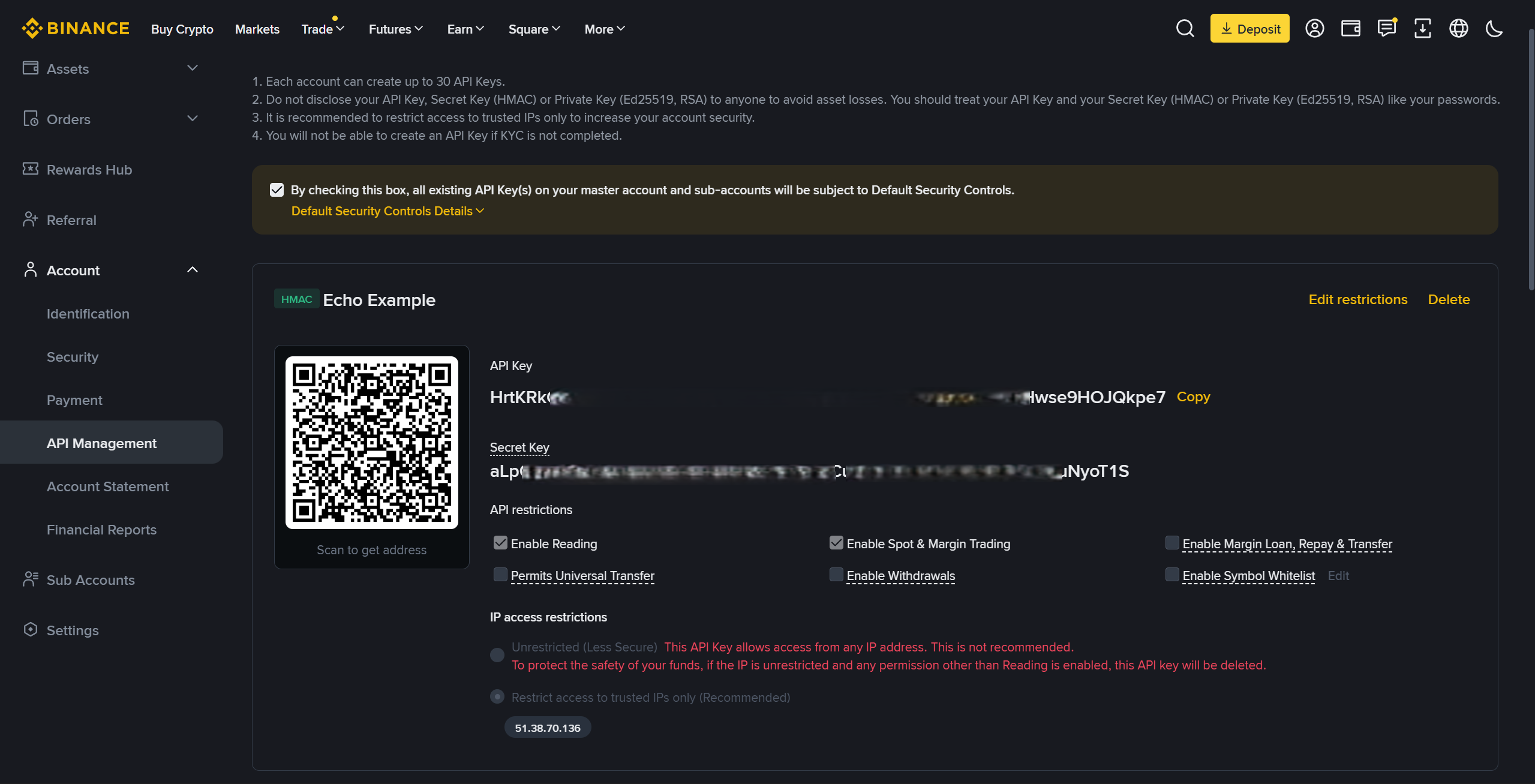
- Click the 'Edit Restrictions'" button
- Under IP restrictions, select the 'Restrict access to trusted IPs only (Recommended)' option, enter this IP:
51.38.70.136and press confirm (It is compulsory to do this or trading permissions will be unavailable) - Select the 'Enable Spot & Margin Trading' checkbox
- Copy your API Key and API Secret and press 'Save' ⚠️Record them down as you will only be able to view them on Binance once.
- Complete 2FA again to complete the set-up
Make sure to not enable settings that could put your funds at risk, such as settings like Account Transfer and Withdrawals
WARNING: As the Signals use Binance's spot asset selection, there may be a mismatch with available assets on MEXC, in which case Echo will keep the capital meant for unavailable assets in USDT
Creating a MEXC Account
- Sign up for an account here. (If you already have an account, we recommend creating a fresh one for automation of the signals)
- Deposit Crypto into the spot account.
MEXC does not require KYC for trading, transfers, deposits or withdrawals, if they ask you to complete the KYC process, you can skip it.
Creating your API Key
- Go to MEXC's API Creation Dashboard.
- Start Creating Your API Key
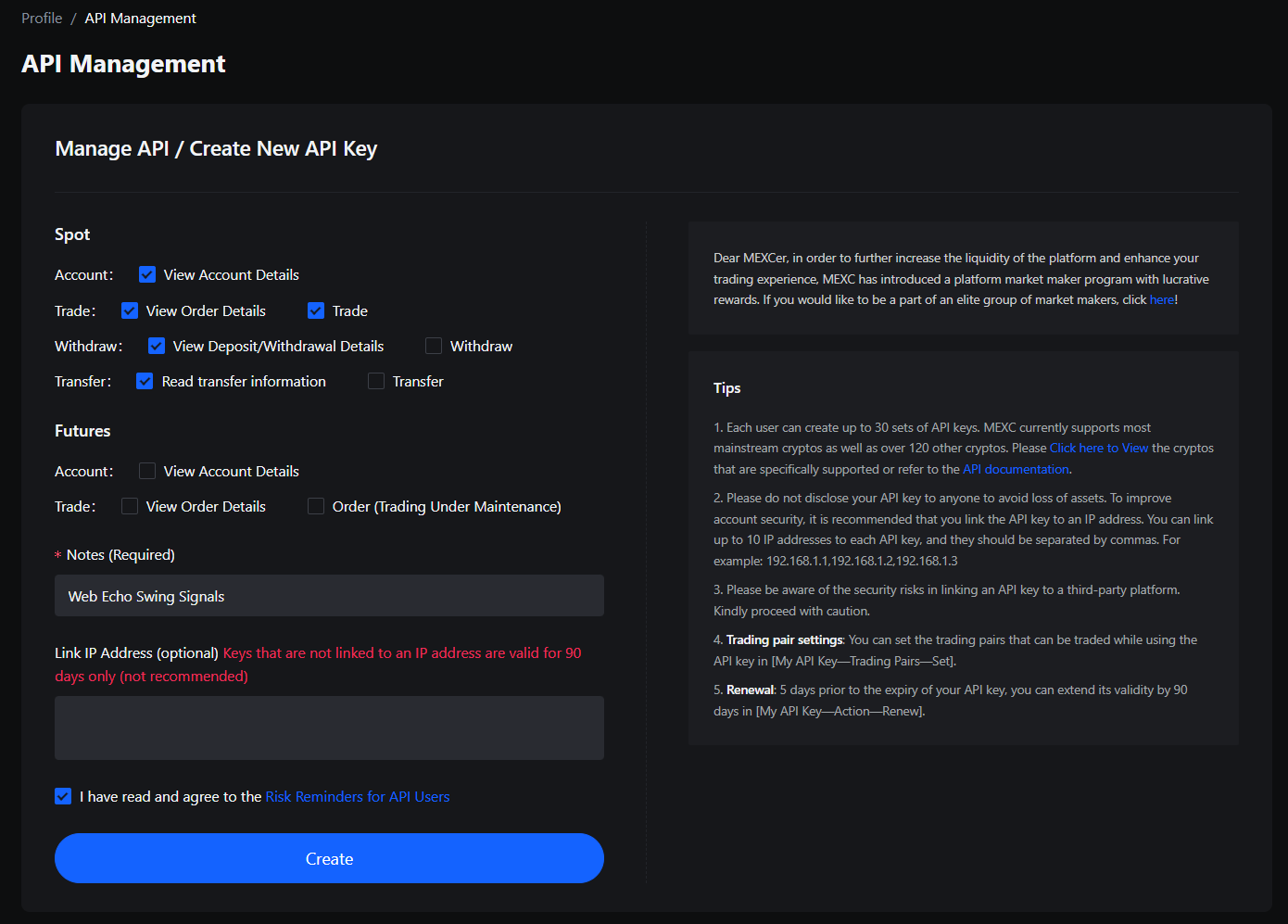
- There will be two sections, 'Spot' and 'Futures'. We will only use 'Spot'
- Under 'Spot', next to 'Account', enable View Account Details
- Under 'Spot', next to 'Trade', enable View Order Details and Trade
- Under 'Spot', next to 'Withdraw', enable View Deposit/Withdrawal Details
- Under 'Spot', next to 'Transfer', enable Read transfer information
- Leave 'Link IP Address (optional)' blank.
- Press 'create', you should be prompted to go through security verification after which you will be given an API key along with the API secret. ⚠️Record them down as you will only be able to view them on MEXC once.
Make sure to not enable settings that could put your funds at risk, such as settings like Account Transfer and Withdrawals
If you'd like to whitelist Echo's IP address, you can do so by whitelisting 51.38.70.136
Setting Up Echo
- Save API Key: Go to AlgoAlpha's Swing Signals Echo dashboard, be sure to be logged into your account.
- Under 'Exchange', select BINANCE/MEXC.
- Fill in the 'API Key' and 'API Secret' fields using the API key you created.
- Press 'Save API Settings'
- Configuring Echo:
- Under 'Stablecoin', select USDT.
- Monitoring Trades:
- Our automation rebalances your portfolio daily at 0030 UTC, so do not worry if you do not see any trades executed for a while.
It's not recommended to place other trades outside of the signals on the account you have connected as the program will likely exit any positions not in the signals by 0030 UTC daily
-
Starting and Managing Echo
- Starting the Bot: Once all settings are configured, Press save. Echo will automatically execute trades based on signals from 🔔│swing-signals.
- Updating Settings: If any settings are modified, be sure to press the save button.
- All Trade History can be seen on your exchange of choice (Binance/MEXC).
-
Requirements for Reliable Operation
To ensure smooth functioning, Echo requires:
- An active AlgoAlpha Signals or VIP Bundle subscription
- A recommended minimum account size of $1000 in the spot account