
Usage Limits
Atlas applies usage limits so the service stays responsive and fair. Track your remaining AI chat usage as a percentage and learn what affects it.
AI chat usage
Atlas includes a usage allowance for AI chat so the service remains responsive and available to all users. Your current availability is shown in Atlas as a percentage remaining.
The percentage does not represent a fixed number of messages or credits. Different conversations can use different amounts depending on the model selected and the amount of work required. The usage meter in Atlas is the best way to check your current availability.
- What uses your allowance: Sending messages in chat—including follow-ups, answers to multiple-choice questions, and Atlas's replies. Usage generally increases with longer prompts, deeper analysis, more steps, and longer conversation history.
- What does not use your allowance: Browsing the dashboard, opening and managing strategy cards, portfolio tracking, changing settings, and running backtests on your own strategies.
Reset: Your allowance refreshes on a daily schedule at midnight UTC. Unused usage does not roll over into the next period.
Running out: When the meter reaches 0% remaining, AI chat is temporarily unavailable until the next reset. Atlas will show the expected reset time when relevant. You can still use the rest of Atlas while you wait.
Atlas may also display a warning when your remaining usage is getting low.
Switching models (Atlas Lite vs Atlas)
Below the chat input you can choose:
| Model | Typical use | Relative usage |
|---|---|---|
| Atlas Lite (Default) | Fast answers, straightforward strategy searches | 3x-4x lower usage per exchange |
| Atlas | Harder questions, comparisons, multi-step reasoning | Higher usage per exchange |
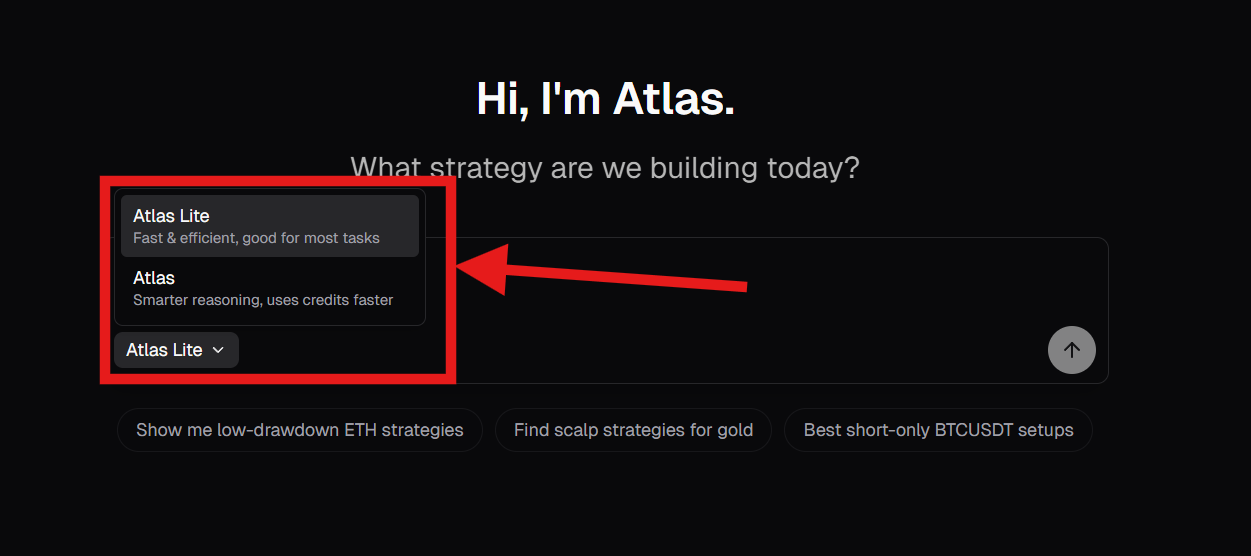
You may switch at any time between messages. Use Atlas Lite for straightforward tasks where extra depth is unnecessary. Switch to Atlas when the task requires more extensive analysis and you are comfortable using more of your available allowance.
More context: Chatting with Atlas (model selector and sessions).
Making your usage last longer
Atlas uses your current session's history so follow-ups make sense. As a conversation becomes longer, each new message may use more of your allowance because Atlas has more context to process.
Practical habit: When you move to a new topic or a new strategy search and the current thread is already long, click New Chat instead of continuing in the same session. Your older chats remain available; starting a new chat simply creates a clean context for the next task.
Combine that with specific first messages—including the asset, timeframe, indicator, conditions, and objective—so Atlas needs fewer clarification rounds. See Prompting Tips and Finding Strategies for more guidance.
Quick checklist: (1) Prefer Atlas Lite for simple jobs. (2) Use New Chat for unrelated questions after a long thread. (3) Put the important constraints in message one.
Other limits
Sometimes Atlas shows a short message if something is busy, unavailable, or needs a retry. Follow any on-screen instruction such as “wait” or “try again.” If nothing helps after a short wait, use AlgoAlpha Support & Knowledge.